7 Best Website Builders for Beginners in 2026 (No Experience Needed)
My first website took three days and looked like it had been assembled in the dark. In 2026, the best builders get a complete beginner live in under an hour. Here is which one to start with and why.

Cyrus
The first website I ever built took three days and looked like it had been assembled in the dark.
This was before drag-and-drop editors were the norm. I was moving HTML table cells around by hand, trying to make a portfolio that would not embarrass me, and failing comprehensively. When I showed it to a friend who knew what she was doing, she pointed to the broken layout on mobile and said 'oh, you forgot to think about anything smaller than 1024 pixels.' I had not known I needed to think about that.
Nobody builds websites like that anymore. The builders available to a complete beginner in 2026 are genuinely extraordinary compared to what existed even five years ago. AI generates a starting site from a sentence. Templates are beautiful out of the box. The drag-and-drop editors are intuitive enough that a person who has never thought about web design can publish something professional-looking in an afternoon.
The challenge has shifted. It is no longer 'how do I build a website.' It is 'which of these tools is actually built for someone who has no experience, and what will I need to figure out on my own even after I pick one.' This guide answers both questions honestly.
What Makes a Website Builder Truly Beginner-Friendly
Not all builders that call themselves beginner-friendly are. Some have a five-minute onboarding that gets you to a template, then leave you to figure out 200 settings on your own. Here is what I actually look for.
Criterion | What it means for a beginner |
|---|---|
Time from signup to published site | A genuinely beginner-friendly builder gets you to something live in under 2 hours on your first attempt, not after reading a manual. |
AI site generation | In 2026, the best builders generate a complete starting site from a short description. This removes the blank page problem that stops most beginners before they start. |
Template quality | A template that looks professional without customization makes the beginner's job easier. A template that requires heavy editing to look acceptable is not a beginner template. |
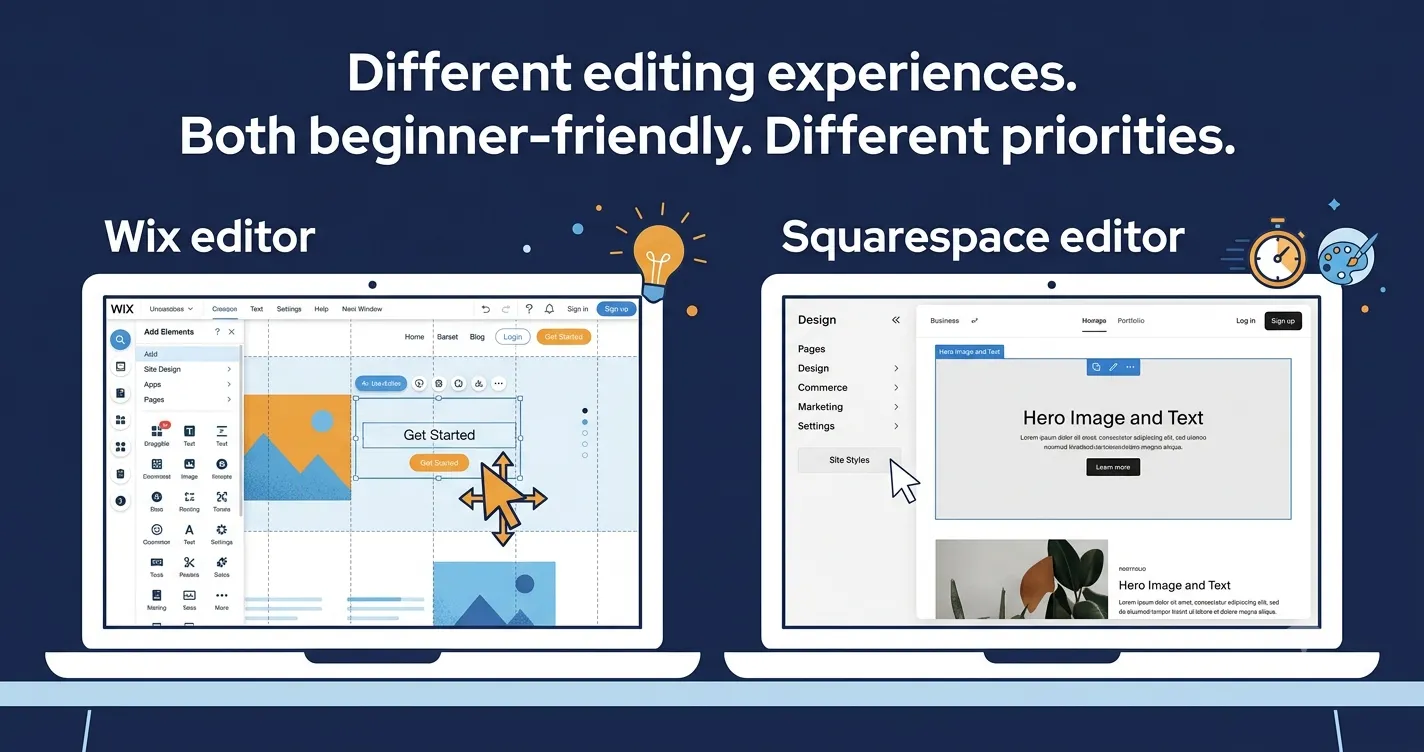
Editor intuitiveness | Can you move an element by clicking and dragging it? Can you change the font without finding a settings menu? The editor should feel like common sense. |
Mobile preview built in | Beginners should be able to see and edit the mobile version without separate configuration. |
Help and support | When something goes wrong, is there live chat? A decent knowledge base? A community forum that actually answers questions? |
Honest pricing | The monthly fee on the home page should be what you actually pay. Builders that show a low number then require a plan upgrade to use basic features are a beginner trap. |
The 7 Best Website Builders for Beginners in 2026
Wix — Best overall for beginners
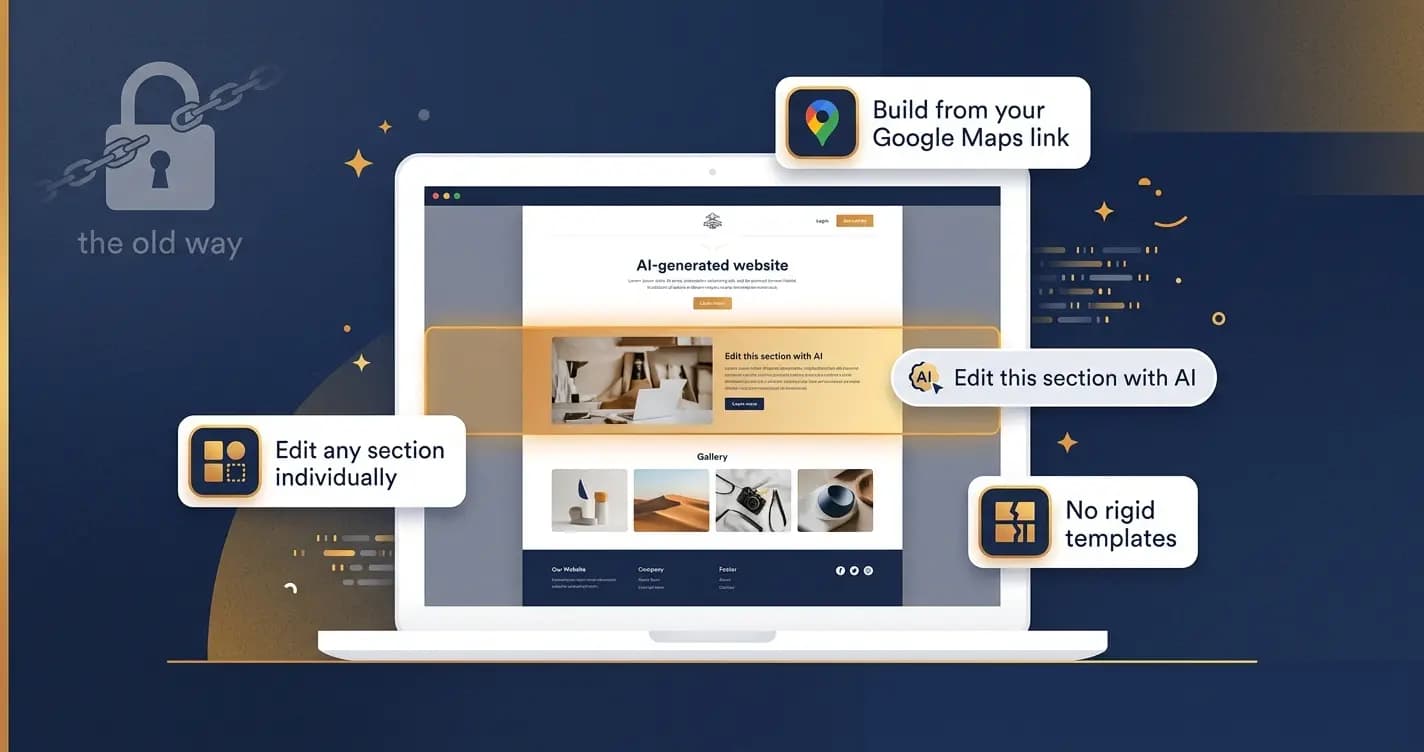
Wix is the most popular website builder in the world and, for most beginners, the right choice. The drag-and-drop editor is the most intuitive available: you click on any element, it highlights, you move it. The AI builder asks a few questions about your site's purpose and generates a complete starting template including copy, layout, and images. The template library has over 900 designs. And the Wix App Market means that when you discover you need a booking system, an email newsletter, or a membership area three months from now, you can add it without migrating to a new platform. That last point matters more than most beginners realize at the start.
Pros | Cons |
|---|---|
Most intuitive drag-and-drop editor available for beginners | Cannot change template once your site is live without rebuilding |
AI website builder generates a complete starting site from a description | Free plan includes Wix branding on your domain |
900+ templates across every website category | Feature richness can feel overwhelming in the early stages |
App Market for adding features as your site grows | Pages are not exportable if you decide to leave the platform |
Free plan available to experiment before paying | |
24/7 live chat support |
Pricing: Free plan. Light from $17/month. Core from $29/month (unlocks full features).
Best for: Beginners who want the most flexible, feature-complete platform they can grow into.
Squarespace — Best design quality for beginners
Squarespace is what most beginners picture when they imagine a professional website. The templates are the most visually polished of any builder tested. The editor is clean and the learning curve is gentler than Wix because there are fewer options to navigate. Blueprint AI, their AI builder launched in 2025, generates a site with more design coherence than most AI builders produce. For beginners who care primarily about how their site looks, Squarespace is consistently the builder that produces the most impressive starting point with the least effort.
Pros | Cons |
|---|---|
Most polished, professional-looking templates of any beginner builder | More expensive than Wix and Hostinger at equivalent tiers |
Blueprint AI generates a coherent, on-brand starting site | Less design flexibility than Wix once you go beyond the template |
Clean editor with fewer overwhelming options than Wix | No free plan, trial only |
Scheduling, invoicing, email marketing all included at higher tiers | Some beginners find the editor less intuitive than Wix's pure drag-and-drop |
14-day free trial, no credit card required |
Pricing: From $16/month (Personal). $23/month (Business). 14-day free trial.
Best for: Beginners who prioritize design quality and want a beautiful site with minimal effort.
Hostinger Website Builder — Best for getting live in under 30 minutes
Hostinger has one of the best AI website generators available in 2026. You describe your business or project in a few sentences and it generates a complete site, with relevant content, images, and layout, in under a minute. That is not a demo. That is the actual experience. For a beginner whose biggest fear is starting from a blank template and not knowing what goes where, Hostinger removes the entire blank-page problem. Plans start at $2.99/month, which is the lowest on this list and genuinely includes the core features a beginner needs.
Pros | Cons |
|---|---|
Best AI generator on this list: full site from a description in under 1 minute | Less design customization depth than Wix or Squarespace |
Lowest starting price: from $2.99/month | Only 8 industry-specific template categories, fewer niche options |
Includes free domain for first year on most plans | No app store: features available at launch are what you get |
AI tools for SEO, content writing, and image generation built in | Renewal prices significantly higher after introductory period |
Fast-loading hosting included, no separate hosting account needed |
Pricing: From $2.99/month (introductory). Renews at higher rate. Check current pricing before committing to a long term.
Best for: Beginners who want to get something professional live as fast as possible at the lowest price.
GoDaddy Airo — Fastest setup of any builder tested
GoDaddy's Airo platform holds a specific record among beginner website builders: it is the fastest from signup to a published site with a custom domain of anything tested in 2026. The AI onboarding asks five questions about your business, generates a site, and you can be live with a custom domain in under 20 minutes if you already have a domain in mind. It is not the most customizable builder and the templates are less visually impressive than Squarespace or Wix. But for a beginner whose goal is to have something professional live today rather than something perfect live eventually, GoDaddy Airo is the right answer.
Pros | Cons |
|---|---|
Fastest setup of any builder: live site possible in under 20 minutes | Less design flexibility and template variety than Wix or Squarespace |
AI onboarding generates a complete site from 5 questions | Less suitable for sites that need to grow significantly over time |
AI Receptionist feature handles customer enquiries automatically | Pricing is less transparent than some competitors |
Good for service businesses that need basic online presence fast | Feature depth behind Wix for anything beyond a basic site |
Integrates with GoDaddy email and domain management seamlessly |
Pricing: From $9.99/month. Check GoDaddy for current promotional pricing.
Best for: Beginners who need a professional web presence live today with minimal setup time.
Webflow — Best for beginners who want to become advanced
Webflow is not a beginner builder in the traditional sense. The learning curve is steeper than any other option on this list. But it earns its place here because it is the best builder for someone who identifies as a beginner today but expects to need full design control within 12 months. Webflow's visual editor produces clean, semantic HTML and CSS without you writing a line of code. The sites it produces are the most professionally customizable of any builder available. For a beginner who is planning to invest time in learning, Webflow is the platform with the highest ceiling.
Pros | Cons |
|---|---|
Highest design ceiling of any no-code builder | Steepest learning curve on this list by a significant margin |
Produces clean, professional code that scales with your skills | Not suitable for a true beginner who needs to be live quickly |
Strong free plan for learning the platform | Pricing becomes expensive at commercial tiers |
Best choice for beginners who expect to become power users | eCommerce features less developed than Shopify or Wix |
Excellent for portfolio and creative industry websites |
Pricing: Free (Webflow branding). Basic from $14/month. CMS from $23/month.
Best for: Beginners with time to invest in learning who want a platform they will not outgrow.
IONOS Website Builder — Best value for budget-conscious beginners
IONOS starts at $1/month for an introductory period, making it the most aggressively priced beginner builder available. The AI text generator and SEO dashboard added in 2026 are genuinely useful, and the builder includes features like an AI Receptionist chatbot that most builders at this price do not offer. For a beginner who has a very tight budget and needs a professional web presence without the full feature set of Wix, IONOS delivers more than the price suggests.
Pros | Cons |
|---|---|
From $1/month introductory pricing, lowest effective cost available | Template customization is more limited than Wix or Squarespace |
AI SEO dashboard with actionable optimization suggestions built in | Introductory $1/month price increases significantly at renewal |
AI Receptionist chatbot for automated customer responses | Less suitable for complex sites with multiple content types |
Good for simple service business websites | Smaller ecosystem than Wix or Squarespace for adding features |
24/7 customer support included |
Pricing: From $1/month (introductory). Check current renewal pricing before committing.
Best for: Budget-conscious beginners who need a clean, simple web presence at the lowest possible monthly cost.
Squarespace Blueprint AI — Best AI-generated starting point for design-focused beginners
This is technically within Squarespace rather than a separate builder, but Blueprint AI deserves a separate mention because it represents the most significant shift in how beginners start building a site. Instead of choosing from a template library, Blueprint AI asks about your goals, style preferences, and content structure, then generates a customized site design that fits your specific situation. The result is a better starting point than any template because it is tailored rather than generic. For a design-focused beginner who would previously have spent hours choosing and adapting a template, Blueprint AI cuts that time to under 15 minutes.
Pros | Cons |
|---|---|
Generates a tailored site based on your goals, not a generic template | Requires a Squarespace subscription to access |
Better starting point than template-library browsing for most beginners | Less useful if you have a very specific design vision already |
Design coherence across pages from the start | Generated content still requires review and editing |
Built into the Squarespace subscription at no extra cost | Fewer template variations than Wix's 900+ library |
Faster to a good-looking result than template customization |
Pricing: Included in all Squarespace plans from $16/month.
Best for: Design-focused beginners who want a starting site that looks tailored rather than template-generic.
Quick Comparison: All 7 Builders
Builder | Setup time | AI generator | Free plan | Design quality | Starting price | Best for beginners who... |
|---|---|---|---|---|---|---|
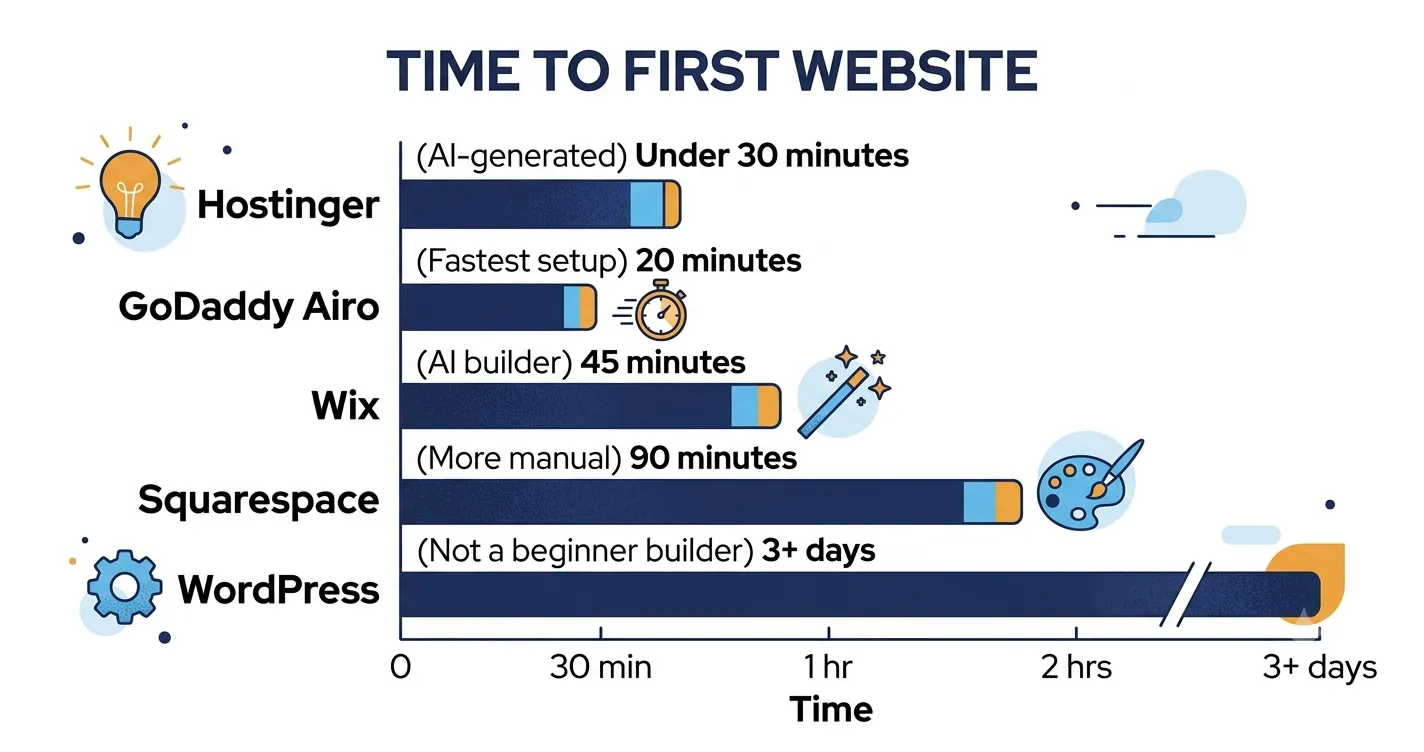
Wix | 45 to 60 min | Yes | Yes (branded) | Very Good | $17/month | Want the most features to grow into |
Squarespace | 60 to 90 min | Yes (Blueprint AI) | No (14-day trial) | Excellent | $16/month | Want the best-looking site |
Hostinger | Under 30 min | Best on list | No (trial) | Good | $2.99/month | Want fastest setup at lowest cost |
GoDaddy Airo | Under 20 min | Yes | No | Good | $9.99/month | Need something live today |
Webflow | Days to learn | Limited | Yes | Professional | $14/month | Plan to become advanced users |
IONOS | 30 to 45 min | Yes (content) | No | Decent | $1/month (intro) | Have a tight budget |
Squarespace Blueprint AI | Under 15 min | Best design AI | No (trial) | Excellent | $16/month | Want tailored design from day one |
The One Thing Most Beginners Get Wrong
They choose based on price.
I have seen more beginner website projects derailed by picking the cheapest plan than by any technical problem. The pattern is always the same: pick the lowest price, build the site, discover the feature they need (online booking, a blog, a shop, an email newsletter) requires an upgrade, and either pay more than they would have if they had picked the right plan upfront, or abandon the site because upgrading feels like starting over.
The better question is not 'what is the cheapest plan' but 'what do I need this site to do in 6 months?' A portfolio site that just needs to look good and have a contact form can stay on Squarespace's Personal plan forever. A service business that will want online booking, email marketing, and a newsletter needs Wix's Core plan or Squarespace's Business plan from the start.
Pick your use case. Then pick the builder. Then pick the plan that covers what you will actually need. That is the order.
A final note: the best website builder for a beginner is the one you actually finish. Pick a platform from this list, set a 2-hour timer, and publish something. You can always improve it later. The perfect-plan-never-published is the most common beginner mistake of all.
Frequently asked questions
Hostinger and GoDaddy Airo are the fastest to a published site from zero experience. Hostinger's AI generator creates a complete site from a short description in under a minute. GoDaddy Airo's onboarding gets you to a live domain in under 20 minutes. For a beginner who also wants a high-quality result and is willing to spend 60 to 90 minutes on setup, Squarespace is consistently the easiest route to a professional-looking site. Wix is the best choice for beginners who expect their site to grow significantly in complexity.
No. All seven builders on this list are explicitly designed for people with no coding knowledge. You click to select elements, drag to move them, and use menus to change colors and fonts. The AI generators go even further: you describe what you want and the builder creates it. Coding knowledge becomes relevant only if you want to do something very specific that the builder does not support natively, which rarely affects beginners.
Wix and Webflow both offer free plans. Wix's free plan gets you a functional site on a Wix-branded domain (yourname.wixsite.com). Webflow's free plan is best for learning the platform. Squarespace, Hostinger, and GoDaddy offer free trials, typically 14 days, without a credit card. The honest answer is that a professional web presence with a custom domain (yourname.com) typically costs $10 to $30/month. Free plans exist for experimentation but are not suitable as a permanent professional web presence because of platform branding on your URL.
With an AI builder like Hostinger or GoDaddy Airo, you can have something live in under an hour. With Wix or Squarespace, expect 2 to 4 hours for a solid first version. That timeline covers choosing a template, replacing placeholder content with your own copy and images, setting your colors and fonts, and checking the mobile version. Adding pages, refining copy, and optimizing for search typically takes additional sessions over the following week. A beginner's first website is almost always a work in progress rather than a finished product, and that is completely normal.
They serve different beginner priorities. Wix is better if you want maximum flexibility and a large app ecosystem to add features later. Squarespace is better if design quality is your primary concern and you want the most professional-looking result with the least design work. Both are genuinely beginner-friendly. If you are building a portfolio, creative work, or design-forward service site, start with Squarespace. If you are building anything else and expect the site to grow in complexity, start with Wix.
Written by
Cyrus
Head of Marketing, Entro
Cyrus writes about mobile app marketing, ASO, and conversion optimization. He's spent the last 3+ years helping indie developers and startup founders get more downloads from organic channels, without paid UA budgets.
Before Entro, he ran growth for two consumer apps that together passed 500,000 downloads on the App Store. Most of what he writes comes from mistakes made with his own money first.
Related articles